
simple project เพื่อทดลองใช้งาน Logback บน simple log formatter for Java (SLF4J)
โดยหลักการ เหมือน SLF4J เป็นมาตราฐาน ส่วน Logback นับเป็น implementor
ขั้นแรก เราก็ add dependencies เหล่านี้
implementation ‘org.slf4j:slf4j-api:2.0.12’
// Logback (The Implementation – รวมถึง Binding)
implementation ‘ch.qos.logback:logback-classic:1.4.14’
// สำหรับ Project เก่าที่ใช้ Log4j 1.x (ถ้ามี) เพื่อ Bridge ไป SLF4J
// implementation ‘org.slf4j:log4j-over-slf4j:2.0.12’
/*
 * This file was generated by the Gradle 'init' task.
 *
 * This generated file contains a sample Java application project to get you started.
 * For more details on building Java & JVM projects, please refer to https://docs.gradle.org/9.3.1/userguide/building_java_projects.html in the Gradle documentation.
 */

plugins {
    // Apply the application plugin to add support for building a CLI application in Java.
    id 'application'
    id("com.gradleup.shadow") version "9.3.1"
}

repositories {
    // Use Maven Central for resolving dependencies.
    mavenCentral()
}

dependencies {
    // Use JUnit Jupiter for testing.
    testImplementation libs.junit.jupiter

    testRuntimeOnly 'org.junit.platform:junit-platform-launcher'

    // This dependency is used by the application.
    implementation libs.guava

    // SLF4J API (The Facade)
    implementation 'org.slf4j:slf4j-api:2.0.12'

    // Logback (The Implementation - รวมถึง Binding)
    implementation 'ch.qos.logback:logback-classic:1.4.14'

    // สำหรับ Project เก่าที่ใช้ Log4j 1.x (ถ้ามี) เพื่อ Bridge ไป SLF4J
    // implementation 'org.slf4j:log4j-over-slf4j:2.0.12'

}

// Apply a specific Java toolchain to ease working on different environments.
java {
    toolchain {
        languageVersion = JavaLanguageVersion.of(21)
    }
}

application {
    // Define the main class for the application.
    mainClass = 'com.imm.UmgTest.App'
}

tasks.named('test') {
    // Use JUnit Platform for unit tests.
    useJUnitPlatform()
}
จากนั้น ในห้อง resource สร้างไฟล์ logback.xml
<?xml version="1.0" encoding="UTF-8"?>
<configuration>

    <property name="LOG_PATTERN"
              value="[%d{yyyy-MM-dd HH:mm:ss.SSS}] [%thread] [%X{script.name}] [%X{username}] [%line] [%-5level] [%logger] -> %msg%n" />

    <appender name="SIFTING_LOG" class="ch.qos.logback.classic.sift.SiftingAppender">

        <discriminator>
            <key>username</key>
            <defaultValue>system</defaultValue>
        </discriminator>

        <sift>
            <appender name="FILE-${username}" class="ch.qos.logback.core.rolling.RollingFileAppender">

                <file>logs/${username}/${username}.log</file>

                <rollingPolicy class="ch.qos.logback.core.rolling.TimeBasedRollingPolicy">
                    <fileNamePattern>logs/${username}/archive/${username}-%d{yyyy-MM-dd}.log</fileNamePattern>
                    <maxHistory>30</maxHistory>
                </rollingPolicy>

                <encoder>
                    <pattern>${LOG_PATTERN}</pattern>
                </encoder>

            </appender>
        </sift>
    </appender>

    <root level="info">
        <appender-ref ref="SIFTING_LOG" />
        </root>

</configuration>
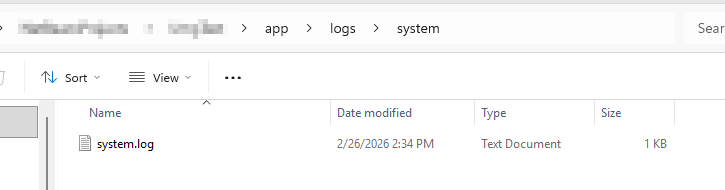
logs/${username}/${username}.log
ชื่อ log file ถ้าไม่กำหนด user ใดๆ มา จะถูกเก็บอยู่ที่ logs/system/system.log
ตัวอย่าง logback configuration เก็บไว้ที่ห้อง resource ด้านนอกเลย
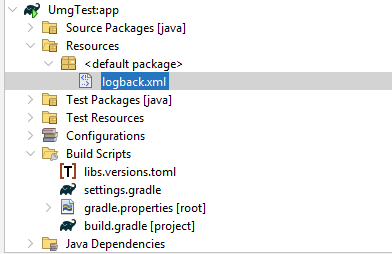
ใน file code java ของเรา ก็เรียกใช้ได้เลย
private static final Logger logger = LoggerFactory.getLogger(App.class);
/*
 * This source file was generated by the Gradle 'init' task
 */
package com.imm.UmgTest;

import org.slf4j.Logger;
import org.slf4j.LoggerFactory;
import org.slf4j.MDC;

public class App {

    private static final Logger logger = LoggerFactory.getLogger(App.class);

    public String getGreeting() {
        logger.info("ABC {}, {}, {}", "a", 2, 3);
        return "Hello World!";
    }

    public static void main(String[] args) {
        System.out.println(new App().getGreeting());
    }
}
[2026-02-26 14:34:05.905] [main] [] [] [17] [INFO ] [com.imm.UmgTest.App] -> ABC a, 2, 3
เรายังสามารถเพิ่ม ตัวแปร หรือค่าเฉพาะบางอย่างเข้าไปใน log ได้ด้วย MDC
/*
 * This source file was generated by the Gradle 'init' task
 */
package com.imm.UmgTest;

import org.slf4j.Logger;
import org.slf4j.LoggerFactory;
import org.slf4j.MDC;

public class App {

    private static final Logger logger = LoggerFactory.getLogger(App.class);

    public String getGreeting() {
        MDC.put("username", "Thada");
        MDC.put("script.name", "output.drill");
        logger.info("ABC {}, {}, {}", "a", 2, 3);
        MDC.remove("script.name");
        MDC.remove("username");
        return "Hello World!";
    }

    public static void main(String[] args) {
        System.out.println(new App().getGreeting());
    }
}
[2026-02-26 14:33:01.179] [main] [output.drill] [Thada] [17] [INFO ] [com.imm.UmgTest.App] -> ABC a, 2, 3
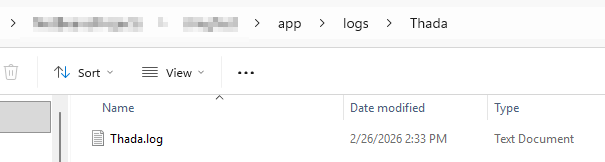
เมื่อมีการกำหนด ชื่อ username ชื่อไฟล์และตำแหน่งก็จะเปลี่ยน จาก logs/system/system.log เป็น logs/Thada/Thada.log
More info เกี่ยวกับ pattern ของ log และชื่อไฟล์
https://logback.qos.ch/manual/layouts.html
https://logback.qos.ch/manual/configuration.html
